Monday, September 24, 2012

HDS (HTTP Dynamic Streaming) Workflow (flow) for Live media

The best way to experience the workflow for live HTTP streaming is to complete a tutorial. See Stream live media (HTTP).
The following is the workflow for all Adobe HTTP Dynamic Streaming and Apple HTTP Live Streaming use cases:
  1. Use the default live event or create a live event.
    The default live event is rootinstall/applications/livepkgr/events/_definst_/liveevent. Each live event contains configuration settings for one set of content. For more information, see Create and configure live events.
  2. (Optional) To configure multi-bitrate streaming, use the Set-level F4M/M3U8 File Generator tool to generate an set-level manifest file. The set-level manifest file contains information about each stream. See Publish and play live multi-bitrate streams over HTTP.
  3. (Optional) To configure DVR for Adobe HTTP Dynamic Streaming, create a set-level manifest file.
    To configure a Sliding Window for Apple HTTP Live Streaming, configure the httpd.conf, Application.xml, or Event.xml file.
    See Configure DVR (HDS) and Configure a sliding window (HLS).
  4. (Optional—Adobe HTTP Dynamic Streaming) To encrypt content for protected HDS, see Configure protected HTTP Dynamic Streaming (PHDS).
    To encrypt content for use with Flash Access, edit the Event.xml file. See Encrypt content for Flash Access protection.
  5. (Optional—Apple HTTP Live Streaming) To encrypt content for Apple HTTP Live Streaming, see Protect content for Apple HLS.
  6. Create a crossdomain.xml file and copy it to the rootinstall\webroot folder.
    A crossdomain.xml file allows Flash Player clients hosted on other domains to access data from this domain. For more information, see Website controls (policy files) in the ActionScript 3.0 Developer’s Guide.
  7. Publish a stream to the server.
  8. (Adobe HTTP Dynamic Streaming) Use Strobe Media Playback to play media. Strobe Media Playback is installed with Flash Media Server.
  9. (Apple HTTP Live Streaming) Play the content on iOS or MacOS.
    For supported devices, see Apple HTTP Live Streaming documentation.

HDS (HTTP Dynamic Streaming) Components

The Adobe HTTP Streaming solution contains the following components:
Live Packager
Live Packager is a Flash Media Server application installed to rootinstall/applications/livepkgr. The server ingests a live stream over RTMP and the Live Packager translates it into F4F files and MPEG-2 TS files in real-time.
F4F HTTP Module
An Apache HTTP Server module that serves files to Flash Player and AIR. The F4F module (also known as the HTTP Origin Module), serves live content. It also serves on-demand content that was packaged offline with the File Packager tool. The F4F HTTP Module installs with Flash Media Server 4 and later to rootinstall/Apache2.2/modules/mod_f4fhttp.so. The module is also available from adobe.com as a stand-alone Apache module.
HLS HTTP Module
An Apache HTTP Server module that serves files to iOS devices and Mac OS. The HTTP HLS Module installs with Flash Media Server 4.5 and later to rootinstall/Apache2.2/modules/mod_hlshttp.so. It is not available as a stand-alone Apache module.
JIT HTTP Module
An Apache HTTP Server module that packages on-demand files just-in-time and serves them to Flash Player and AIR. “Just-in-time” means that media files are packaged in real-time when clients request them. The JIT HTTP Module installs with Flash Media Server 4.5 and later to rootinstall/Apache2.2/modules/mod_jithttp.so. It is not available as a stand-alone Apache module.
File Packager
A command-line, offline tool that translates on-demand media into F4F fragments. The File Packager is located in the rootinstall/tools/f4fpackager folder and is available from adobe.com.
OSMF media players
There are several media players built on the Open Source Media Framework (OSMF) that support HTTP Dynamic Streaming to Flash Player and AIR. See Pre-built media players.
F4F File Format Specification
The F4F file format describes how to divide media content into segments and fragments. The Live Packager, the File Packager, and the JIT HTTP module output content based on this specification. Each fragment has its own bootstrap information that provides cache management and fast seeking. For more information, see F4F File Format Specification.
F4M File Format Specification
The Flash Media Manifest file format contains information about a package of files that the HTTP Origin Module can serve. Manifest information includes codecs, resolutions, and the availability of files encoded at multiple bit rates. Manifest information also includes DRM data. The media player uses the F4M file to play a piece of media. For more information, see F4M File Format Specification.
Flash Access
Flash Access delivers protected media to Flash Player. To use HTTP Dynamic Streaming with Flash Access, use the File Packager and Flash Media Server to both package and encrypt content. For more information, see Protecting content with Flash Access.Flash Media Server 4.5 adds support for Flash Access level protection without using a Flash Access server. See Configure protected HTTP Dynamic Streaming (PHDS) and Configure protected HTTP Live Streaming (PHLS).

Thursday, September 20, 2012

Fragmented MP4 Format - fMP4 - F4F - Adobe and Microsoft thoughs adoption

Two companies that contributed to this white paper—Adobe and Microsoft—shared thoughts on
their journey towards fMP4.

For more than a decade, that business centered on the Real-Time Media Protocol (RTMP) that Adobe launched back in 2001 with Flash Player 6. RTMP stood at the heart of Adobe Flash Media Server (FMS) and many de facto workflows sprung up around the protocol, although it was extended over the years to address encryption (RTMP-E) and peer-to-peer delivery (RTMFP).
One such enhancement to FMS was a precursor to Adobe’s foray into HTTP delivery. Back in December 2009, with the release of FMS 3.5.3, Adobe essentially decoupled the buffer from the connection, allowing semi-stateless connection between player and server and empowering Flash Player to continue play back even if the connection dropped. Developers can use ActionScript to
reconnect to Flash Player to FMS and, if reconnection occurs before the buffer empties, there is no perceived disruption in client playback, critical for mobile video delivery on intermittent networks.
Adobe saw opportunity to provide similar workflows for devices that did not use its Flash Player plug-in. In 2010, Adobe announced Adobe HTTP Dynamic Streaming (HDS), an HTTP-based adaptive streaming approach that built on fMP4 as its base protocol.
“This is a very different approach than our RTMP delivery with Adobe FMS, which uses normal FLV or MP4 (F4V) file formats,” said Kevin Towes, Adobe’s senior product manager for delivery. “The MP4-Fragment format [Adobe calls it F4F] adheres to the industry standard which is important for re-usability. The format also enabled a major requirement for media streaming – protection—
allowing you to deliver your live or pre-recorded content, leverage the caching devices, and still maintain control over your video assets.”
As part of the new Flash Media Server, announced in September 2011, Adobe enhanced support for both manifest (F4M) and fragment (F4F) file formats. Adobe uses an XML-based solution it calls F4M version 2, similar in concept to a variant playlist in what Adobe calls “set level manifests”.
“Workflows in RTMP have more than a decade of robustness behind them,” said Towes, “but the same workflows haven't been as easy in HTTP. Our investment into the HTTP workflows—bringing them on par with RTMP workflows—allows established FMS customers to maintain their sizable desktop/laptop viewer base while also pursuing new iPad and other iOS device revenue streams.”
Modifications to F4F allow real-time packaging, protection and features such as variant playlists to act on par with RTMP-based workflows. For encryption, FMS encrypts F4F fragments within FMS, using either a built-in Flash Access encryption module or a stand-alone Flash Access server.


Adobe emphasizes the point that fMP4 natively allows for network optimization and content encryption, but it also notes that different devices require different optimizing tweaks for delivery. Leveraging FMS for both desktop and mobile devices, including creation of HLS-based transport streams, Adobe feels it can supply content to every device at optimal resolutions and bandwidths. Seeking is one such area: given the ability to identify and deliver a byterange via fMP4,  Adobe can bring its “seek” enhancement from RTMP directly into an HTTP delivery scenario. When enabled, seeking occurs first within the buffer,  significantly reducing the load on the server compared to traditional back-and-forth seeks between client and server. The duration of the buffer can be dynamically changed, something not currently possibly in MPEG-2 TS solutions, to allow for pseudo-DVR functions such as instant replay or simple time-shifting options within the player. This also allows playback at different speeds and frame-accurate stepping from scene to scene. “We try to help broadcasters realize new revenue streams,” said Adobe’s Kevin Towes, “regardless of platform being delivering to. Where Flash Player is available, we'll use RTMP or HTTP Dynamic Streaming to deliver world-class quality of experience, encryption and rights management. With other platforms, such as iOS-based devices, we'll do an equally good job. Adobe also sees the benefit of standards-based approaches like the Common File Format, HTML5 and  MPEG-DASH.”


Microsoft. Microsoft had a significant installed Windows Media® user base for well over ten years. Yet the company announced in late 2008 it was moving toward fragmented MP4 with the launch of Smooth Streaming, a first-to-market adoption of fMP4. Smooth Streaming combines Windows Server® and Silverlight® (or other Smooth Streaming clients) with XML and SMIL manifests.
Manifests have an *.ismv extension. Manifests indicate to an adaptive streaming client what bitrates are available in a file set, where fragments reside, and header parameters from each video file. Microsoft stores like-bitrate "chunks" of video as movie fragments in a single file, using timecode information stored in each movie fragment (moof) as an index for particular segments to download
and play back. Smooth Streaming devices download movie fragments containing either a video closed Group of Pictures (GOP) or an integral number of audio sync frames, via a single HTTP request. The player than select segments (typically 2-4 seconds long) from multiple streams encoded with different bitrates, resolutions, languages, etc.
What were Microsoft’s reasons for choosing fMP4 over ASF? The company notes five:
• MP4 is a lightweight container format with less overhead than ASF
• MP4 is easier to parse in managed code (.NET) than ASF
• MP4 is itself a widely used standard, making 3rd party adoption / support more straightforward
• MP4 was architected with H.264 video codec support in mind
• MP4 was designed to natively support payload fragmentation within the file

“The MPEG-4 fragmented format was able to do everything we needed,” wrote Ben Waggoner, principle program manager at Microsoft, “so it was simplest to just use that rather than make up something new. We're not trying to make up a new file format here; just take advantage of existing technologies in a novel way.”
“ASF was a great format for bit-pumping,” wrote Waggoner in 2009, “with a MIPS-per-Mbps ratio better than other formats of its era. However, it simply wasn't well set up to allow a byterange to encapsulate a fragment that could potentially be a single closed GOP. Since server hardware is so much more powerful these days and proxy caching so dramatically reduces the load on the origin server, going for a somewhat more complex server-side parsing methodology made good sense.”
Microsoft chose to go “all in” around the standard, including use of *.ismv and *.mp4 extensions. What have they done with Smooth Streaming since its announcement in 2008? Quite a lot, actually. Smooth Streaming has seen significant traction with Silverlight, but doesn’t require Silverlight to deliver adaptive bitrate HTTP streaming, as evidenced by Smooth Streaming clients such as the Comcast® XFINITY® TV App for iOS devices and Linux-based  Netgem set-top boxes. Such non-Silverlight clients can be created using a Smooth Streaming client source-porting kit from Microsoft that enables playback on any device.
In addition, publication of a Smooth Streaming specification, called PIFF (protected interoperable
file format) has been adopted—along with Microsoft PlayReady® DRM technology—for use in new Netflix ready devices and applications, including the Apple iPad. Microsoft has also enabled several compelling scenarios—including advertising and alternate language tracks—on top of fMP4. In addition, the Microsoft ecosystem surrounding the Smooth Streaming format includes two key tools: Expression® Encoder for live- and on-demand Smooth Streaming encoding and IIS Media Services. The latter rides on top of the Microsoft Internet Information Services (IIS) web server that ships in every version of Windows Server 2008.
Another very interesting part of the workflow, that I’ve covered for several trade publications as well as the Workflowed blog, is IIS Transform Manager, a server-side transcoding and transforming tool. Transform Manager can convert a variety of formats, including segmented .mp4 files, to Smooth Streaming presentations. It can also convert Smooth Streaming content for use on Apple iOS devices, converting from fMP4 to HLS (MPEG-2 TS) as part of its standard workflow. Transform Manager scales out on multi-core HPC clusters, plus allows audits of all file copies/movement to improve monitoring/management control.
Microsoft is committed to supporting the standards-based approach, including the Common File Format (CFF), Common Encryption (CENC) and the MPEG-DASH adaptive delivery over HTTP.

Wednesday, September 19, 2012

Difference between HTTP Dynamic Streaming and RTMP Dynamic Streaming

HTTP Dynamic Streaming can provide additional benefits and enables significant improvements over
progressive delivery. Some advantages of HTTP Dynamic Streaming over HTTP progressive download include:
•     Delivery cost reduction by utilizing Internet caching infrastructure
•     Easier firewall traversal
•     Higher burstable capacity by utilizing standard CDN load-balanced networks and HTTP infrastructure caching
•     Live streaming with adaptive bitrate, DVR support, and integrated content protection powered by Flash Access
•     Continuous protection of content throughout the distribution chain, closing some potential vulnerabilities
•     OSMF for rapid custom video player development, offering easy integration with advertising and analytics
•     Bitrate throttling to help ensure only what is watched is delivered
•     Media navigation supporting enhanced seeking and start anywhere
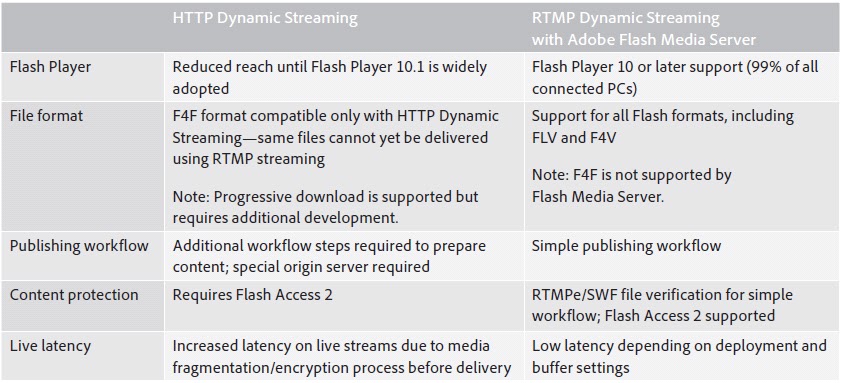
The following table shows some differences between HTTP Dynamic Streaming and RTMP Dynamic Streaming.


F4F File Format Specification

The F4F file format describes how to divide media content into segments and fragments.
Each fragment has its own bootstrap information that provides cache management and fast seeking. For more
information


see F4F File Format Specification
at Adobe site.

F4M File Format Specification Examples (HTTP Dynamic Streamin)

Example Manifest Files


A single piece of media

With a duration of 253 seconds.
<?xml version="1.0" encoding="utf-8"?>
<manifest xmlns="http://ns.adobe.com/f4m/1.0">
 <id>myvideo</id>
 <duration>253</duration>
 <media url="rtmp://example.com/myvideo"/>
</manifest>


Multiple bitrate streams and (externally specified) DRM and HTTP bootstrapping information that applies to all streams

Note that the media files and bootstrap info are specified relatively to the baseURL tag, whereas the DRM AdditionalHeader file is specified absolutely.
<?xml version="1.0" encoding="utf-8"?>
<manifest xmlns="http://ns.adobe.com/f4m/1.0">
 <id>myvideo</id>
 <duration>253</duration>
 <mimeType>video/x-flv</mimeType>
 <streamType>recorded</streamType>
 <baseURL>http://example.com"</baseURL>
 <drmAdditionalHeader url="http://mydrmserver.com/mydrmadditionalheader"/>
 <bootstrapInfo profile="named" url="/mybootstrapinfo"/>
 <media url="/myvideo/low" bitrate="408" width="640" height="480"/>
 <media url="/myvideo/medium" bitrate="908" width="800" height="600"/>
 <media url="/myvideo/high" bitrate="1708" width="1920" height="1080"/>
</manifest>

Multiple bitrate streams, each with both DRM and HTTP bootstrapping information

This example also includes an explicit moov atom for each stream. Note that the DRM and HTTP blocks are shared for some streams, but not all.
<?xml version="1.0" encoding="utf-8"?>
<manifest xmlns="http://ns.adobe.com/f4m/1.0">
 <id>ABC</id>
 <startTime>2009-11-29T21:53:12-08:00</startTime>
 <duration>253</duration>
 <mimeType>video/mp4</mimeType>
 <streamType>recorded</streamType>
 <deliveryType>streaming</deliveryType>
 <drmAdditionalHeader id="ah1">
  BASE64 encoding of DRM AdditionalHeader
 </drmAdditionalHeader>
 <drmAdditionalHeader id="ah2">
  BASE64 encoding of DRM AdditionalHeader
 </drmAdditionalHeader>
 <bootstrapInfo id="boot1" profile="named">
  BASE64 encoding of bootstrap information
 </bootstrapInfo>
 <bootstrapInfo id="boot2" profile="named">
  BASE64 encoding of bootstrap information
 </bootstrapInfo>
 <media url="http://example.com/myvideo/low" bitrate="408"
                            bootstrapInfoId="boot1" drmAdditionalHeaderId="ah1">
  <moov>
   BASE 64 encoding of moov
  </moov>
 </media>
 <media url="http://example.com/myvideo/med" bitrate="1108" 
                 bootstrapInfoId="boot1" drmAdditionalHeaderId="ah2">
  <moov>
   BASE 64 encoding of moov
  </moov>
 </media>
 <media url="http://example.com/myvideo/high" bitrate="1708"
                        bootstrapInfoId="boot2" drmAdditionalHeaderId="ah2">
  <moov>
   BASE 64 encoding of moov
  </moov>
 </media>
</manifest>


RTMFP multicast media

<?xml version="1.0" encoding="utf-8"?>
<manifest xmlns="http://ns.adobe.com/f4m/1.0">
 <id>myvideo</id>
 <streamType>live</streamType>
 <media url="rtmfp://example.com/myapp" groupspec="G:XYZXYZXYZ" 
                              multicastStreamName="mystream"/>
</manifest>


DVR media

<?xml version="1.0" encoding="utf-8"?>
<manifest xmlns="http://ns.adobe.com/f4m/2.0">
 <id>myvideo</id>
 <streamType>live</streamType>
 <dvrInfo windowDuration="1800" offline="false" />
 <media url="rtmpe://example.com/myapp" />
</manifest>


HDS stream with alternative audio tracks

Also known as "late-binding audio".
<?xml version="1.0" encoding="utf-8"?>
<manifest xmlns="http://ns.adobe.com/f4m/1.0">
 <id>myvideo</id>
 <streamType>recorded</streamType>
 <duration>100</duration>
 <label>English</label>
 <lang>en</lang>
 <mimeType>video/mp4</mimeType>
 <baseURL>http://example.com/</baseURL>
 <bootstrapInfo profile="named" id="boot1">
  BASE64 encoding of bootstrap information
 </bootstrapInfo>
 <bootstrapInfo profile="named" id="boot2">
  BASE64 encoding of bootstrap information
 </bootstrapInfo>
 <bootstrapInfo profile="named" id="boot3">
  BASE64 encoding of bootstrap information
 </bootstrapInfo>
 <media url="myvideo" bitrate="1300" bootstrapInfoId="boot1" />
 <media url="myvideo_audio1" bitrate="192" bootstrapInfoId="boot2" 
                    type="audio" label="Espanol" lang="es" alternate="true" />
 <media url="myvideo_audio2" bitrate="192" bootstrapInfoId="boot3" 
                    type="audio" label="Chinese" lang="zh" alternate="true" />
</manifest>


Multiple bitrate streams, each with HTTP Streaming bootstrap information

Also having alternate audio tracks.
<?xml version="1.0" encoding="utf-8"?>
<manifest xmlns="http://ns.adobe.com/f4m/1.0">
 <id>myvideo</id>
 <label>English</label>
 <lang>en</lang>
 <streamType>recorded</streamType>
 <duration>100</duration>
 <mimeType>video/mp4</mimeType>
 <baseURL>http://example.com/</baseURL>
 <bootstrapInfo profile="named" id="boot1">
  BASE64 encoding of bootstrap information
 </bootstrapInfo>
 <bootstrapInfo profile="named" id="boot2">
  BASE64 encoding of bootstrap information
 </bootstrapInfo>
 <bootstrapInfo profile="named" id="boot3">
  BASE64 encoding of bootstrap information
 </bootstrapInfo>
 <bootstrapInfo profile="named" id="boot4">
  BASE64 encoding of bootstrap information
 </bootstrapInfo>
 <bootstrapInfo profile="named" id="boot5">
  BASE64 encoding of bootstrap information
 </bootstrapInfo>
 <media url="myvideo_250" bitrate="250" bootstrapInfoId="boot1" />
 <media url="myvideo_500" bitrate="500" bootstrapInfoId="boot1" />
 <media url="myvideo_900" bitrate="900" bootstrapInfoId="boot1" />
 <media url="myvideo_1300" bitrate="1300" bootstrapInfoId="boot2" />
 <media url="myvideo_2100" bitrate="2100" bootstrapInfoId="boot3" />
 <media url="myvideo_audio1" bitrate="192" bootstrapInfoId="boot4" 
                  type="audio" label="Espanol" lang="es" alternate="true" />
 <media url="myvideo_audio2" bitrate="192" bootstrapInfoId="boot5"
                  type="audio" label="Chinese" lang="zh" alternate="true" />
</manifest>


A multi-level manifest

Note:
  • <dvrInfo> is set in the set-level manifest.
  • <bootstrapInfo> is set in the stream-level manifests.
  • Even though the two streams use the same bootstrapInfo id to refer to different bootstrap files, there’s no conflict, as the scope of <bootstrapInfo> is limited to the file that it’s in.
  • Similarly, the scope of <baseURL> is the manifest it is in.
Set-Level Manifest
<?xml version="1.0" encoding="utf-8"?>
<manifest xmlns="http://ns.adobe.com/f4m/2.0">
 <id>myVideo</id>
 <baseURL>http://www.example.com/myvideo/</baseURL>
        <dvrInfo offline="false" windowDuration="600" />
 <streamType>live</streamType>
 <media href="stream250.f4m" bitrate="250" />
 <media href="stream500.f4m" bitrate="500" />
</manifest>
Stream-Level Manifest 1
<?xml version="1.0" encoding="utf-8"?>
<manifest xmlns="http://ns.adobe.com/f4m/1.0">
 <id>myStream1</id>
 <baseURL>http://www.example.com/data/</baseURL>
        <bootstrapInfo profile="named" id="boot1" url="myvideo_250.bootstrap" />
 <media url="myvideo_250" bitrate="250" bootstrapInfoId="boot1" />
</manifest>
Stream-Level Manifest 2
<?xml version="1.0" encoding="utf-8"?>
<manifest xmlns="http://ns.adobe.com/f4m/1.0">
 <id>myStream2</id>
        <bootstrapInfo profile="named" id="boot1" 
                 url=”http://www.example.com/data/myvideo_500.bootstrap” />
        <media url="http://www.example.com/data/myvideo_500" 
                        bitrate=”500” bootstrapInfoId=”boot1” />
</manifest>

F4M File Format Specification ( HTTP Dynamic Streaming)


Flash Media Manifest (F4M) File Format

Overview

The Flash Media Manifest is a file format that contains information about a Flash media asset. This information includes the location of the media, DRM authentication information, media bootstrap information, multi-bitrate information (MBR), etc. The intended workflow is that a media player loads and "plays" a manifest file as if it were an atomic media file. The load process might involve DRM authentication, HTTP bootstrapping, and selection of the appropriate MBR rendition.
The manifest file itself is an XML document that represents a single piece of media, for example, a music video. That music video might have multiple variations (e.g. related instances of the video with different bit rates, localized content, etc.), but a single manifest file would never encapsulate more than that one music video. To represent more than one distinct piece of media (for example, an entire album of music videos) requires multiple manifests or the use of other encapsulation formats (such as SMIL or RSS/Atom).
A manifest file can include metadata, DRM settings, and/or bootstrap information, and each can be assigned to the piece of media as a whole (that is, to all instances of the media), or to a specific instance. In the former case, the information is placed under the root of the manifest, while in the latter case the information is placed directly under the representation to which it applies.
This document describes the structure of the F4M file format, which is currently at version 2.0. It is published as an open specification.

Terminology

Manifest File
An instance of a file of this format.
F4M
The file extension for a file of this format.
DRM
Digital Rights Management, as implemented in Flash Player v10.1.
MLM
Multi-level manifest, a concept introduced in F4M 2.0 to provide support for manifest file hierarchies.
Set-Level Manifest
A manifest file that groups individual stream-level manifest files.
Stream-Level Manifest
A manifest file describing a single <media> instance.


Highlights

Some important aspects of the file format:
  • A manifest file can contain multiple representations of the same piece of media. These representations could vary by bit rate, dimensions, or MIME type. For example, a manifest file could contain pointers to five different bit rate FLV files and three different bit rate MP4 files.
  • No assumptions are made about the media type(s) that a manifest file contains. The primary use case is video, but there's no reason to assume that a manifest would never contain something else.
  • A manifest file can contain one shared DRM additional header block which applies to all media files, or per-file DRM additional header blocks.
  • A manifest file can contain one shared bootstrap information block which applies to all media files, or per-file bootstrap information. For example, there could be one bootstrap information block which applies to all FLV versions of the media, and a second bootstrap information block which applies to all MP4 versions of the media (assuming there are FLV- and/or MP4-specific bootstrapping algorithms).
  • The bootstrap information block contains the raw data included in the bootstrapinfo box. As such, consumers of a manifest file need to parse this binary data to find the info that's relevant to the bootstrapping algorithm.
  • Both the DRM additional header and bootstrap info can be specified as external files (via URLs).
  • The DVR info can be specified as an external file, so that the client application can periodically re-retrieve it.
  • Each URL in the document can be absolute, relative to a manifest-wide base URL, or (if no manifest-wide base URL is specified) relative to the manifest file itself.
  • A manifest file can contain the moov atom, the metadata block, and the XMP metadata block for each file.
    • Note: Starting with F4M 2.0, the moov atom and the XMP metadata block are deprecated.
  • The manifest file is an XML structure in a specific namespace. This enables the inline integration of manifest XML documents in other XML documents (e.g. RSS or SMIL).
  • As with most XML languages, developers can extend the manifest file format by placing their own elements in a custom namespace. 


Document Structure

The following sections describe the semantics of each element.


<manifest>

The root element in the document is <manifest>.


<id>

The <id> element represents a unique identifier for the media. It is optional.


<label>

The <label> element is a string representing the default user-friendly description of the media. It is assumed that all representations of the media have the same description, except the alternatives tracks, hence its placement under the document root. It is optional.


<lang>

The <lang> element is a string representing the base language of the piece of media. It is assumed that all representations of the media have the same description, except the alternatives tracks, hence its placement under the document root. It is optional.


<duration>

The <duration> element represents the duration of the media, in seconds. It is assumed that all representations of the media have the same duration, hence its placement under the document root. It is optional.
For live or DVR content, the duration represents the total expected time of the media, not the current duration of the media. Usually for live content, it is 0.


<startTime>

The <startTime> element represents the date/time at which the media was first (or will first be) made available. It is assumed that all representations of the media have the same start time, hence its placement under the document root. The start time must conform to the "date-time" production in RFC3339. It is optional.


<mimeType>

The <mimeType> element represents the MIME type of the media file. It is assumed that all representations of the media have the same MIME type, hence its placement under the document root. It is optional.


<streamType>

The <streamType> element is a string representing the way in which the media is streamed. Valid values include "live", "recorded", and "liveOrRecorded". It is assumed that all representations of the media have the same stream type, hence its placement under the document root. It is optional.


<deliveryType>

The <deliveryType> element indicates the means by which content is delivered to the player. Valid values include "streaming" and "progressive". It is optional. If unspecified, then the delivery type is inferred from the media protocol. For media with an RTMP protocol, the default deliveryType is "streaming". For media with an HTTP protocol, the default deliveryType is also "streaming". In the latter case, the <bootstrapInfo> field must be present.


<baseURL>

The <baseURL> element contains the base URL for all relative (HTTP-based) URLs in the manifest. It is optional. When specified, its value is prepended to all relative URLs (i.e. those URLs that don't begin with "http://" or "https://" within the manifest file. (Such URLs may include <media> URLs, <dvrInfo> URLs, <bootstrapInfo> URLs, <drmAdditionalHeader> URLs, and <alternativeAudioTracks> URLs.)
The <baseURL> element's scope is the file it resides in. For multi-level manifest use, relative URLs in a file (set-level or stream-level) manifest are relative to the <baseURL> from that specific file (or to the location of that file, if <baseURL> is missing).


<drmAdditionalHeader>

The <drmAdditionalHeader> element represents the DRM AdditionalHeader needed for DRM authentication. It contains either a BASE64 encoded representation of, or a URL to, the DRM AdditionalHeader (including the serialized "|AdditionalHeader" string). It is optional.
Attributes:
  • id: The ID of this <drmAdditionalHeader> element. It is optional. If it is not specified, then this header will apply to all <media> elements that don't have a drmAdditionalHeaderId property. If it is specified, then this header will apply only to those <media> elements that use the same ID in their drmAdditionalHeaderId property.
  • url: A URL to a file containing the raw DRM AdditionalHeader. Either the url attribute or the inline BASE64 header (but not both) must be specified. If a specified URL is non-absolute, then it must be relative to the manifest file itself.
Notes: For multi-level manifest use:
  • This element should only be present in the stream-level manifest.
  • This element's scope is the file it resides in. A stream-level manifest's media cannot reference a <drmAdditionalHeader> from a different stream-level manifest.
    • Because of this, there are no conflicts when two <drmAdditionalHeader> elements from different files have the same id.


<bootstrapInfo>

The <bootstrapInfo> element represents all information needed to bootstrap playback of HTTP streamed media. It contains either a BASE64 encoded representation of, or a URL to, the bootstrap information in the format that corresponds to the bootstrap profile. It is optional.
Attributes:
  • id: The ID of this <bootstrapInfo> element. It is optional. If it is not specified, then this bootstrapping block will apply to all <media> elements that don't have a bootstrapInfoId property. If it is specified, then this bootstrapping block will apply only to those <media> elements that use the same ID in their bootstrapInfoId property.
  • profile: The profile, or type of bootstrapping represented by this element. For the Named Access profile, use "named". For other bootstrapping profiles, use some other string (i.e. the field is extensible). It is required.
  • url: A URL to a file containing the raw bootstrap info. Either the url attribute or the inline BASE64 bootstrap info (but not both) must be specified. If a specified URL is non-absolute, then it must be relative to the manifest file itself (or to the baseURL, if specified).
Notes: For multi-level manifest use:
  • This element should only be present in the stream-level manifest.
  • This element's scope is the file it resides in. A stream-level manifest's media cannot reference a <bootstrapInfo> from a different stream-level manifest.
    • Because of this, there are no conflicts when two <bootstrapInfo> elements from different files have the same id.


<dvrInfo>

The <dvrInfo> element represents all information needed to play DVR media. It contains no content, only attributes. It is optional.
Attributes:
  • [deprecated] id: The ID of this <dvrInfo> element. It is optional. If it is not specified, then this DVR info applies to all <media> elements that don't have a dvrInfoId property. If it is specified, then this DVR info applies only to those <media> elements that use the same ID in their dvrInfoId property.
    • Deprecated starting with F4M 2.0
  • url: A URL to a file containing the DVR info. It is optional. If a specified URL is non-absolute, then it must be relative to the manifest file itself (or to the baseURL, if specified). If the url attribute is specified, then the client should periodically re-fetch the DVR info at that URL. The document at that URL must be an XML document whose root element is <dvrInfo>, and whose structure is the same as this element, with the exception that there should be no "url" attribute.
  • [deprecated] beginOffset: The offset, in seconds, from the beginning of the recorded stream. Clients can begin viewing the stream at this location. It is optional, and defaults to zero.
    • Deprecated starting with F4M 2.0
  • [deprecated] endOffset: The amount of data, in seconds, that clients can view behind the current duration. If endOffset is zero, then the clients can view the whole content. It is optional, and defaults to zero.
    • Deprecated starting with F4M 2.0
  • windowDuration: The amount of data, in seconds, that clients can view behind the live point. If windowDuration is -1, then the clients can view the whole content. It is optional, and defaults to -1.
    • Introduced in F4M 2.0
  • offline: Indicates whether the stream is offline, or available for playback. It is optional, and defaults to false.
Notes:
  • For multi-level manifest use with DVR, the <dvrInfo> element should be present in the set-level manifest. The <dvrInfo> elements from the stream-level manifests are ignored.


<media>

The <media> element represents one representation of the piece of media. Each representation of the same piece of media has a corresponding <media> element. There must be at least one <media> element.
Attributes:
  • url: The URL of the media file. It is optional (only one of @url and @href should be present). If a specified URL is non-absolute, then it must be relative to the baseURL (if specified) or the manifest file itself (if no baseURL is present).
  • bitrate: The bitrate of the media file, in kilobits per second. If only one <media> element is in the manifest file, then the bitrate attribute is optional. If more than one <media> element is in the manifest file, then the bitrate attribute is required for each element.
  • streamId: The identifier for media file. It is optional.
  • width: The intrinsic width of the media file, in pixels. It is optional.
  • height: The intrinsic height of the media file, in pixels. It is optional.
  • drmAdditionalHeaderId: The ID of a <drmAdditionalHeader> element which contains the DRM AdditionalHeader for this media file. It is optional.
  • bootstrapInfoId: The ID of a <bootstrapInfo> element which contains the bootstrap info that this media file should use. It is optional. If this attribute is present, then the <url> attribute may represent the base URL of the actual media.
  • [deprecated] dvrInfoId: The ID of a <dvrInfo> element which contains the DVRInfo that this media file should use. It is optional.
    • Deprecated starting with F4M 2.0
  • groupspec: The group specifier for multicast media. It is optional. Multicast is only supported over RTMFP, and only for a single (non-MBR) stream. If specified, then the "url" attribute contains the connection URL, and the "multicastStreamName" attribute must also be specified.
  • multicastStreamName: The stream name for multicast media. It is optional. Multicast is only supported over RTMFP, and only for a single (non-MBR) stream. If specified, then the "url" attribute contains the connection URL, and the "groupspec" attribute must also be specified.
  • type: The type for alternative track. Valid values include "audio+video", "video", "audio", "data" and "text". It is optional and defaults to "audio+video".
  • alternate: Indicate if this representation is an alternate version. Fixed value to true. It is optional.
  • label: The description for alternative track. It is required only if the alternate attribute is present.
  • lang: The language code for alternative track (should be ISO 639-1 or ISO 639-3 codes). It is required only if the alternate attribute is present.
  • href: The URL of an external F4M file. It is optional (only one of @url and @href should be present). If the URL is non-absolute, then it must be relative to the baseURL (if specified) or the manifest file itself (if no baseURL is present in the manifest)
    • Introduced in F4M 2.0
Notes:
  • The stream-level manifest indicated by the @href attribute should only contain one <media> element
  • When working with a multi-level manifest, the following attributes are read only from the set-level manifest and ignored in the stream-level manifest:
    • bitrate, streamId, width, height, type, alternate, label, lang
  • When working with a multi-level manifest, the following attributes are read only from the stream-level manifest:
    • drmAdditionalHeaderId, bootstrapInfoId
  • The stream-level manifest's <media> element should link directly to the media file via the @url attribute. It is not allowed to link to another manifest.
  • The set-level manifest should only contain <media> elements with @href.


<moov> (deprecated with F4M 2.0)

Note that the <moov> element was not implemented for the 1.0 version of the HTTP Streaming File Packager.
The <moov> element represents the Movie Box, or "moov" atom, for one representation of the piece of media. It contains a BASE64 encoded representation of the Movie Box for the given representation. It is an optional child element of <media>.
Deprecated starting with F4M 2.0


<metadata>

The <metadata> element represents the stream metadata (i.e. the metadata that is typically dispatched in the onMetaData event) for one representation of the piece of media. It contains a BASE64 encoded representation of the stream metadata for the given representation. It is an optional child element of <media>.


<xmpMetadata> (deprecated with F4M 2.0)

Note that the <xmpMetadata> element was not implemented for the 1.0 version of the HTTP Streaming File Packager.
The <xmpMetadata> element represents the XMP metadata for one representation of the piece of media. It contains a BASE64 encoded representation of the XMP metadata for the given representation. It is an optional child element of <media>.
Deprecated starting with F4M 2.0